iPhone
On the App Store since November 14, with widgets for the Home Screen and Lock Screen, reminders, calendar export and cheers from the person you share a goal with. iOS 16.4 or later.
Announced November 19, 2026
Built by one person, tested by real users, and shaped by one idea: a goal app that judges the year, not the day. As of today, Yearbar is on all three platforms.
Free for up to 5 goals. No account needed to try it.
Live now
Same account on all three. Free to start.
42 days left in this year. Still enough to start.
Yearbar is a yearly goal tracker, and as of November 19, 2026 it is live on all three platforms: the iPhone app on the App Store, the Android app on Google Play and the web app at app.yearbar.app. Every goal gets a progress bar that races the calendar, with a marker showing where you should be by today. It is free for up to 5 goals.
Published
What launched
The same board, the same account, the same free plan. Pick the one that fits the moment.
On the App Store since November 14, with widgets for the Home Screen and Lock Screen, reminders, calendar export and cheers from the person you share a goal with. iOS 16.4 or later.
On Google Play since November 18. Home-screen widgets, the same at-most-one-reminder-a-day rule, and photos backed up when you're on Pro.
Open since October 31 at app.yearbar.app. Nothing to install, and the example board opens without an account, so you can see how a year's pace looks before you commit.
A look inside
What's inside
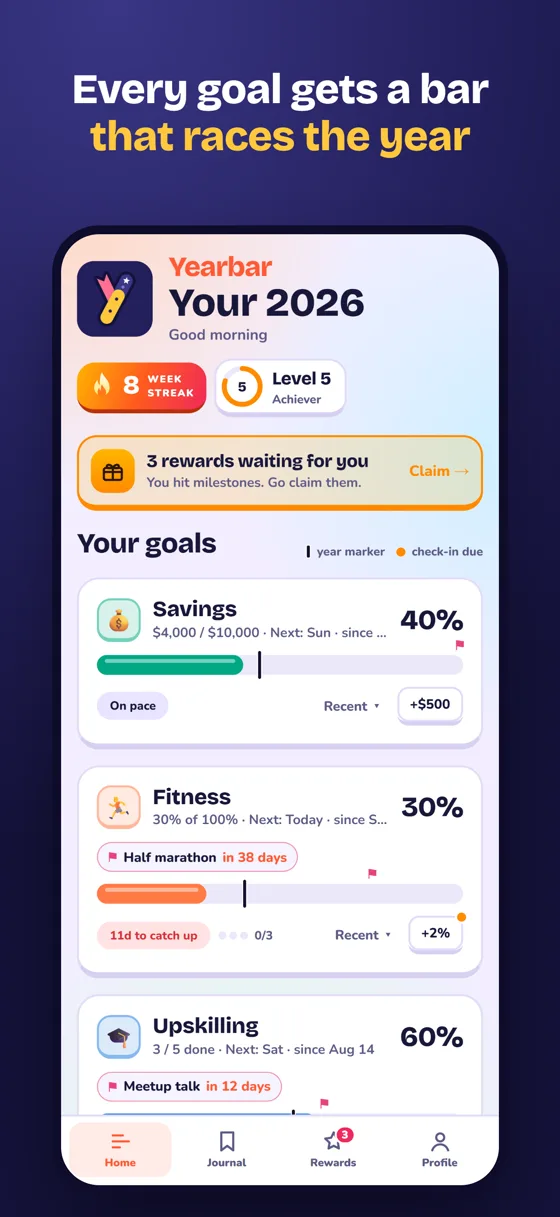
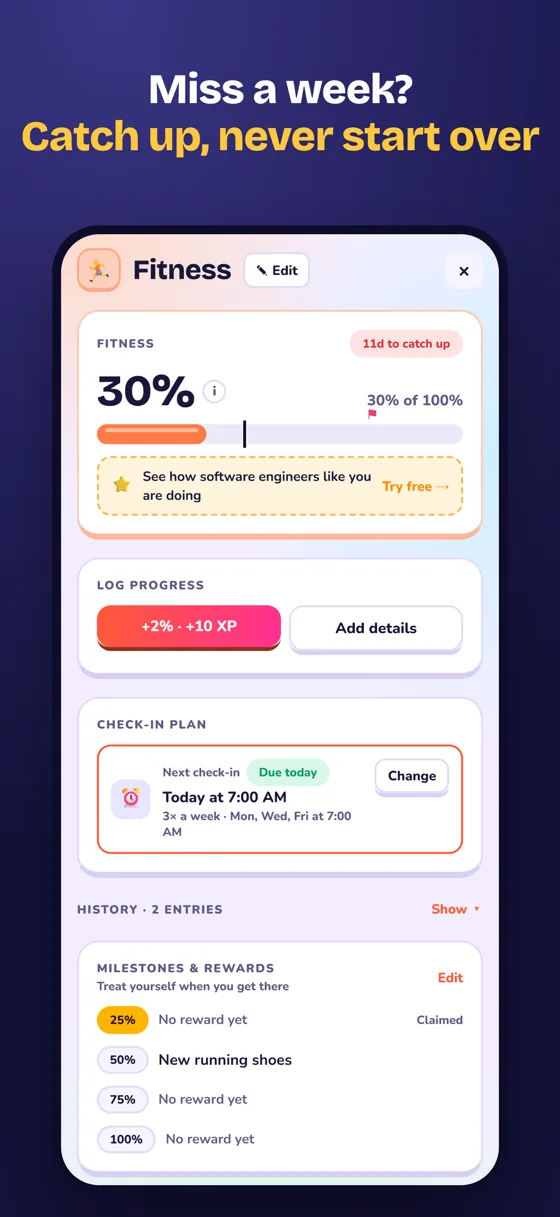
Ahead, on pace, or “12d to catch up”. You always know where the year is compared with where you are.
Everyone holds 2 streak freezes (Pro holds 4). A missed week uses one automatically; nothing is announced as broken.
Pick the day and time you'll check in on each goal. Phones get at most one reminder a day, and it names the goal.
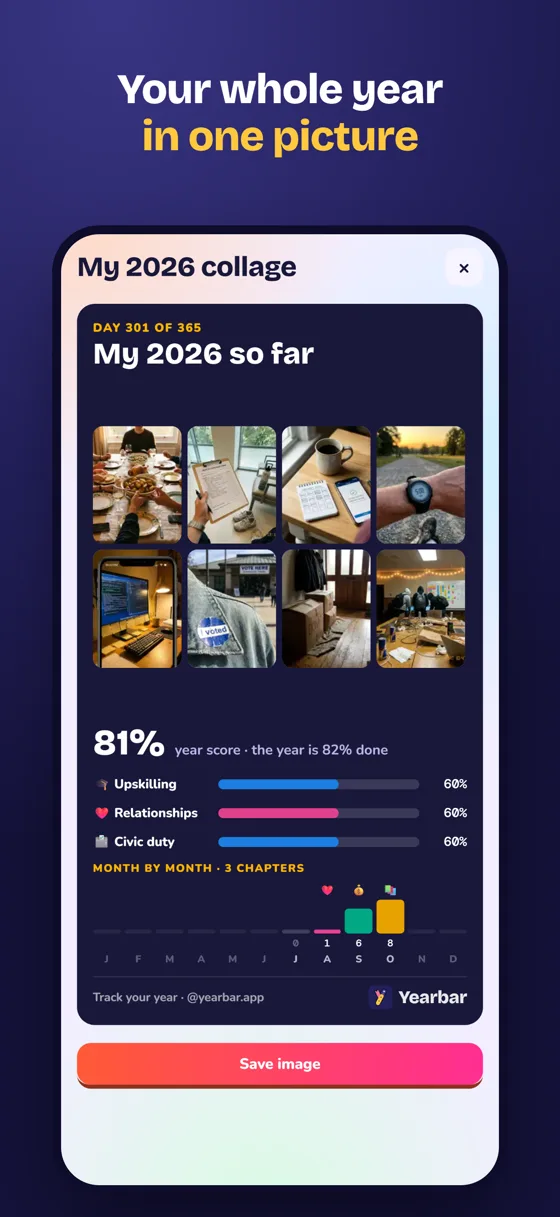
Notes, photos, a month view and a year collage in the shape of a phone screen. Your proof that the year happened.
Set a reward at 25, 50, 75 and 100%, and claim it when you get there. Progress should feel like something.
Counts, money, checklists and percentages. English, Spanish, Portuguese, French, German, Japanese, Russian and Armenian.
Free and Pro
Free: 5 goals, check-ins, milestones and rewards, streak freezes, the journal, and 50 photos backed up on one device. No time limit, no ads, no card.
Pro: unlimited goals, every photo backed up on every device, benchmarks against people like you, a catch-up plan, all the special themes, and a clean year-end recap. Try it free for 7 days, no card.
In the United States, Pro is $3.99 a month, $29.99 a year or $79 once for lifetime. Prices differ by country, and the app shows your store's own price. Yearly is the best value.
How we got here
app.yearbar.app goes live for everyone, with the example board open to anyone who wants to look around first.
The iPhone app ships with the journal, milestones, reminders and the same free plan as the web. Version 1.0.1 followed on November 17 with Home Screen and Lock Screen widgets and calendar export.
Google Play gets the Android app, with home-screen widgets and the same at-most-one-reminder-a-day rule.
iPhone, Android and the web are live together. Yearbar is also on Product Hunt today.
Today only
The launch page has the gallery, the story behind Yearbar and a place to ask anything. Comments are read all day, and honest ones are more useful than kind ones.
Yearbar is on the App Store for iPhone (iOS 16.4 or later), on Google Play for Android, and in any modern browser at app.yearbar.app. All three use the same account, and the free plan covers up to 5 goals.
Yes. The free plan covers 5 goals with check-ins, milestones, rewards, streak freezes and the journal, with no time limit and no ads. Pro adds unlimited goals, photo backup on every device, benchmarks, a catch-up plan, special themes and a clean year-end recap. It has a 7-day free trial with no card.
In the United States, Pro is $3.99 a month, $29.99 a year or $79 once for lifetime. Prices differ by country, and the app shows the price in your own store currency. Yearly is the best value.
Yes. Sign in with the same account and your board, check-ins and photos follow you between devices. Without an account, everything stays on the device you started on.
English, Spanish, Portuguese (Brazil), French, German, Japanese, Russian and Armenian. It follows your device language by default, and you can change it in Profile, under Appearance.
You get a year-end recap with your year score, check-ins and photos. Then you choose which goals to carry into the new year, and each one starts a fresh bar on January 1.
42 days left this year. A goal added today counts from today.